
No products in the cart.

Audio Accessories
Showing all 5 results
- Audio Accessories, Audios
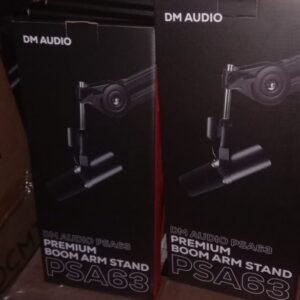
PSA63 Microphone Arm Stand, PODCAST MIC Adjustable Suspension Scissor Arm Stand for RODE, BM 800, for HyperX QuadCast/Blue Yeti/Shure SM7B/Rode NT1, Rotatable Suspension Boom Scissor Stand for Gaming
 Audio Accessories, Audios
PSA63 Microphone Arm Stand, PODCAST MIC Adjustable Suspension Scissor Arm Stand for RODE, BM 800, for HyperX QuadCast/Blue Yeti/Shure SM7B/Rode NT1, Rotatable Suspension Boom Scissor Stand for Gaming
PSA63 Microphone Arm Stand, PODCAST MIC Adjustable Suspension Scissor Arm Stand for RODE, BM 800, for HyperX QuadCast/Blue Yeti/Shure SM7B/Rode NT1, Rotatable Suspension Boom Scissor Stand for Gaming
SKU: 883463999 - Audio Accessories, Audios
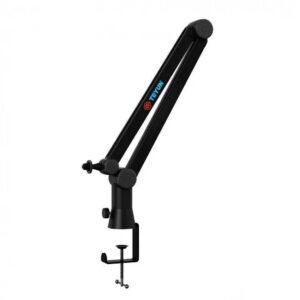
TEYUN NBA-6 Suspension Arm Stand – Arm For Rode Microphone – Desktop Clamp and Cable Management For Recording, Gaming, Streaming, Podcasting For Shure, Neuman, Behringer – Black
Audio Accessories, AudiosTEYUN NBA-6 Suspension Arm Stand – Arm For Rode Microphone – Desktop Clamp and Cable Management For Recording, Gaming, Streaming, Podcasting For Shure, Neuman, Behringer – Black
Tube-Style Broadcast Arm Compass is a premium tube-style desktop arm with internal springs and built-in cable management, ideal for broadcast applications like game streaming, podcasting, voice-over, and more. With smooth, quiet operation and sophisticated on-camera looks, Compass is the perfect…
SKU: 451164422 - Audio Accessories, Audios
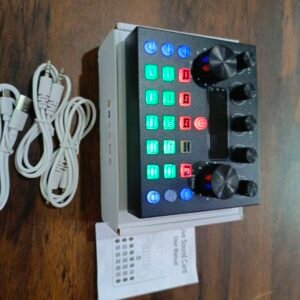
V8s Sound Card with 2 mics input for Live Streaming & Karaoke
Featuring 12 kinds of electricity sound and professional tuning, this sound card can better beautify your voice. This sound card is characterized by four sound effect including male/female/children/monsters voice, which enables it to change your voice freely when live streaming to make the…
SKU: 444195774
Audio Accessories in Pakistan – Mic Stands, Boom Arms & Sound Cards
Browse audio accessories in Pakistan for recording, streaming, podcasting, gaming and speaker setups at SmartBazaar. The range includes microphone boom arms, stands, holders, speaker stands and sound cards for creator and entertainment setups.
Accessory compatibility depends on more than appearance. A boom arm must support the combined weight of the microphone and mounted accessories, a holder must match the microphone body and mounting interface, and an electronic accessory must use the correct connectors for your devices. Desk thickness, thread size, stand capacity, cable requirements and device compatibility can all matter. Check the verified specifications before ordering instead of assuming an accessory is universal.
Shop Audio Accessories for Recording, Streaming & Speaker Setups
Start with the equipment you already own and the problem you need to solve. A boom arm can improve microphone positioning, a holder supports the mic, a speaker stand provides a dedicated placement point, and a sound card can add controls or connections where supported.
Check microphone size and weight, mounting thread, desk or floor space, speaker dimensions, connector type and power requirements. If you still need the main device, you can shop microphones or explore Bluetooth speakers before choosing accessories.
Microphone Boom Arms & Desk Stands
A microphone boom arm is an adjustable support used to position a microphone while allowing changes to distance and angle. Depending on the model, it may clamp to a desk, use internal or external springs, provide adjustable reach or include cable-management features. These details are model-specific.
Boom arms can also keep a microphone off the main desk surface. That may free space for a keyboard, laptop or other equipment, but the arm still needs to suit the microphone, desk and mounting method.
Boom Arm vs Desktop Microphone Stand
A boom arm normally attaches to a desk or mounting point and provides flexible positioning. A desktop stand sits directly on the desk and usually keeps the microphone in a more fixed position. The better choice depends on desk space, microphone weight, recording position and how often you need to move the mic.
Check Microphone Weight Before Buying a Boom Arm
Every boom arm has a supported load range or capacity. The relevant load may include the microphone, shock mount, holder, pop filter and other items attached to the arm.
Compare the manufacturer’s supported load with the combined weight of the setup. Do not assume that a product title mentioning a microphone brand or model proves compatibility. Mounting details and supported weight still need to match.
Understanding 3/8-Inch & 5/8-Inch Microphone Threads
Microphone stands and mounts commonly use thread standards such as 3/8-inch and 5/8-inch. The stand, microphone clip, shock mount or adapter must connect correctly. Some accessories include thread adapters, while others do not.
Before ordering, check the stand thread, the holder or shock-mount thread and whether any required adapter is supplied. Do not assume every boom arm supports both formats.
Desk Clamp Compatibility Matters
Desk-mounted boom arms rely on a clamp or another mounting system. Fit can depend on desk thickness, edge shape, underside clearance and the intended mounting position. A thick frame, drawer or rounded edge can prevent some clamps from fitting correctly.
Measure the mounting area and compare it with the product specification. Also check that the clamp will not interfere with drawers, cables or other desk equipment.
Microphone Holders
A microphone holder supports the microphone body or connects it to a stand. Compatibility can depend on microphone diameter, body shape, holder opening and mounting thread. A holder that looks suitable in a photo may still be too narrow, too wide or use the wrong mounting interface.
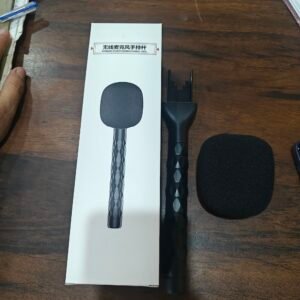
Handheld Wireless Microphone Holders
Handheld wireless microphones vary in body diameter and shape, especially around the transmitter or battery section. Check the microphone dimensions, holder design and mounting interface instead of assuming all handheld wireless mics use the same holder.
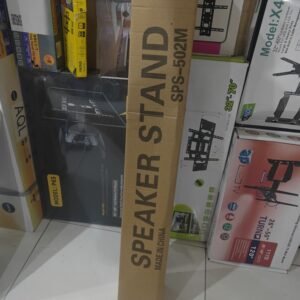
Speaker Stands
Speaker stands can raise a speaker from floor level, provide a defined placement point or help organize a room or performance setup. Placement can influence listening results, but a stand should not be treated as an automatic sound-quality upgrade.
What to Check Before Buying a Speaker Stand
Check the speaker weight, stand load capacity, height, base stability, mounting method and speaker dimensions. If the speaker requires a pole socket or another specific mounting method, confirm that the stand uses the correct interface. Do not assume one stand fits all PA speakers, monitors or portable speakers.
Sound Cards for Streaming & Karaoke
A consumer sound card can add audio controls or connections to a streaming, karaoke or creator setup, depending on the model. Features may include microphone inputs, headphone output, monitoring, volume controls or effects, but these functions vary.
Identify what the sound card must connect to, such as a microphone, headphones, phone or computer. Check the required cables, connectors and power method. Do not assume every sound card supports every phone or computer.
Sound Card vs Audio Interface
A consumer streaming or karaoke sound card is not necessarily the same as a dedicated audio interface. An audio interface commonly focuses on microphone or instrument input, preamplification, analog-to-digital conversion and computer recording. A creator-oriented sound card may focus more on live controls, consumer-device connections or karaoke functions.
Choose according to the workflow you need rather than treating the terms as interchangeable.
What to Check Before Buying a Sound Card
- Microphone inputs: Confirm the number and connector type you need.
- Headphone output: Check whether monitoring is supported.
- Device compatibility: Verify phone or computer support.
- Connections: Match the inputs and outputs to your equipment.
- Cables: Confirm what is required and what is included.
- Power: Check how the device is powered or charged.
- Controls: Review monitoring, volume or effect controls where listed.
- Accessories: Verify the actual package contents.
Podcasting Accessories
A podcast setup may use a microphone, boom arm or desktop stand, holder or shock mount, pop filter, headphones, sound card or audio interface, plus the required cables and adapters. Not every setup needs every accessory.
Choose accessories around the microphone and recording device you already use. Confirm mounting threads, weight, connector types and whether the accessory adds a function your setup actually needs.
Streaming & Gaming Accessories
For streaming or gaming, practical considerations include microphone position, desk space, boom-arm movement, cable routing, monitoring and sound-card compatibility. A movable arm can help reposition a microphone, but its mounting system still needs to suit the desk and mic.
Electronic accessories should also match the computer, console or phone connections in the setup. Focus on the audio connection, positioning or control you need rather than expecting an accessory to improve gaming performance.
Compatibility Matters More Than Brand Name
A product title may mention well-known microphone brands or models, but the brand name alone does not prove compatibility. Microphones from the same brand can differ in weight, dimensions, mounting requirements and holder design.
Check thread size, total mounted weight, holder or shock-mount compatibility and any required adapter. Select accessories from verified mechanical compatibility rather than a familiar brand name in the title.
What Affects Audio Accessory Prices?
Prices can vary by accessory type, construction, supported load, adjustability, mounting design, cable management, stand height, included adapters, connectivity and electronic features. A simple microphone holder is not directly comparable with an adjustable boom arm or electronic sound card.
Use current SmartBazaar product cards for live pricing and availability, then compare price after confirming compatibility with your setup.
What to Check Before Buying Audio Accessories Online
- Identify the accessory: Boom arm, stand, holder, speaker stand or sound card.
- Confirm the main device: Know which microphone, speaker, phone or computer it must work with.
- Check mounting: Compare thread size, holder fit or mounting interface.
- Check weight: Verify microphone or speaker weight against supported capacity where relevant.
- Measure the space: Check desk thickness, clearance or floor area where needed.
- Verify connectors: Match electronic inputs and outputs to your equipment.
- Check adapters: Confirm whether an adapter is required or included.
- Review package contents: Do not assume cables or mounts are supplied.
- Compare specifications: Use verified dimensions and compatibility information.
- Check current price: Review the live listing before ordering.
For related equipment, browse more audio products and match accessories to the main device before completing your setup.
Frequently Asked Questions
What should I check before buying a microphone boom arm?
Check the combined weight of the microphone and mounted accessories, the arm’s supported load, mounting thread, desk-clamp requirements and available desk space. If you use a shock mount or holder, confirm that it attaches to the arm correctly.
What is the difference between a boom arm and a desktop microphone stand?
A boom arm normally mounts to a desk and allows more flexible positioning. A desktop stand sits directly on the desk and usually provides a more fixed position. The better option depends on desk space, microphone weight and how often you move the mic.
Will any boom arm fit any microphone?
No. Compatibility can depend on supported weight, mounting thread, holder or shock-mount design and required adapters. Compare the microphone and mounted accessories with the boom arm specifications before ordering.
What is the difference between 3/8-inch and 5/8-inch microphone threads?
They are different mounting-thread standards used on microphone stands and accessories. If your stand and holder use different sizes, you may need a suitable adapter. Check whether that adapter is included.
How do I know whether a desk clamp will fit my desk?
Measure the desk thickness and inspect the edge and underside clearance where the clamp will sit. Drawers, frames or rounded edges can affect mounting, so compare those details with the clamp specification.
Are microphone holders universal?
No. Holders can differ in opening size, body fit and mounting thread. Handheld microphones also vary in diameter and shape, so compare dimensions and mounting details before purchase.
What should I check before buying a speaker stand?
Check the speaker weight, stand capacity, height, base stability, mounting method and speaker dimensions. Make sure the stand is intended for the type of speaker you plan to use.
What is a sound card used for in streaming?
Depending on the model, a sound card can provide microphone connections, monitoring, volume controls, effects or connections to phones and computers. Check the exact inputs, outputs and supported devices.
Is a sound card the same as an audio interface?
Not necessarily. Creator or karaoke sound cards may focus on live controls and effects, while audio interfaces commonly focus on recording inputs, preamps and computer audio conversion. Compare the functions you need.
What audio accessories are useful for podcasting or streaming?
Useful accessories can include a boom arm or stand, microphone holder, shock mount, pop filter, headphones, sound card or audio interface, cables and adapters. The exact list depends on your microphone, recording device and connection method.