
No products in the cart.

TV & Computer Stands
Showing 49–61 of 61 results
- TV & Computer Stands, TV Mounts & Stands
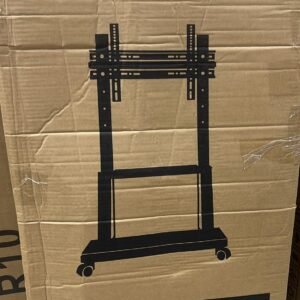
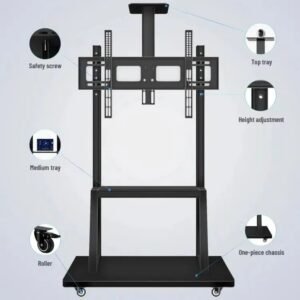
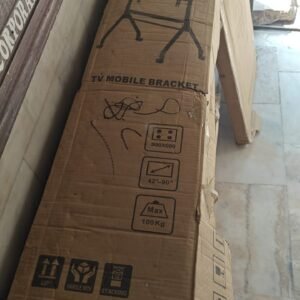
TL-1700 Mobile TV Bracket, Rooling TV Stand with Wheels for 32 to 70 Inch LCD LED OLED
 TV & Computer Stands, TV Mounts & Stands
TL-1700 Mobile TV Bracket, Rooling TV Stand with Wheels for 32 to 70 Inch LCD LED OLED
Model Number: TL-1700 TV size: 32”-75” Max load capacity: 100KG Swivel angle: 180° Tilt angle: up and down 15 ° Thickness: 1.8mm Max.VESA: 600*400 mm G.W/pc: 6 KG Panel Size(L*W) 66.7*20 Carton Size 155*55*5.5 CM Movement Type Swivel, Tilt TV size 70 Inches Color Black Minimum compatible size 32…
SKU: 432372162 - TV & Computer Stands, TV Mounts & Stands
TL-1700 Mobile TV Bracket, Rooling TV Stand with Wheels for 32 to 70 Inch LCD LED OLED (Black)
TV & Computer Stands, TV Mounts & StandsTL-1700 Mobile TV Bracket, Rooling TV Stand with Wheels for 32 to 70 Inch LCD LED OLED (Black)
TL-1700 TV Stand Mobile Bracket With Trolley Model Number: TL-1700 TV size: 32”-75” Max load capacity: 100KG Swivel angle: 180° Tilt angle: up and down 15 ° Thickness: 1.8mm Max.VESA: 600*400 mm G.W/pc: 6 KG Panel Size(L*W) 66.7*20 Carton Size 155*55*5.5 CM Movement Type Swivel, Tilt TV size 70…
SKU: 435973964 - TV & Computer Stands, TV Mounts & Stands
TL-1700 Mobile TV Bracket, Rooling TV Stand with Wheels for 32 to 70 Inch LCD LED OLED (Black)
TV & Computer Stands, TV Mounts & StandsTL-1700 Mobile TV Bracket, Rooling TV Stand with Wheels for 32 to 70 Inch LCD LED OLED (Black)
This is a very stable TV stand for if you still having trouble with putting your TV in your home, office, or any other place you want. This TL-1700 32-70″ Television Trolley Mount Bracket TV Stand can avoid the trouble of how to put your TV. This TV stand can save space in your Living room and…
SKU: 438196208 - TV & Computer Stands, TV Mounts & Stands
TL-1700 Mobile TV Bracket, Rooling TV Stand with Wheels for 32 to 70 Inch LCD LED OLED (Black)
TV & Computer Stands, TV Mounts & StandsTL-1700 Mobile TV Bracket, Rooling TV Stand with Wheels for 32 to 70 Inch LCD LED OLED (Black)
TL-1700 Mobile TV Bracket, Rooling TV Stand with Wheels for 32 to 70 Inch LCD LED OLED (Black) Model TL 1800 55-100 MODEL R-10 42-86 Model Ava-1500 32-75
SKU: 1951063861 - TV & Computer Stands, TV Mounts & Stands
TV Wall Mount SH-44T Classic Tilting
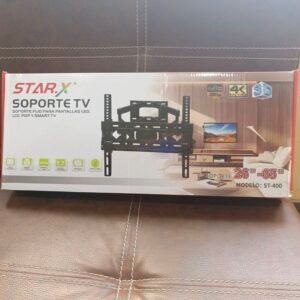
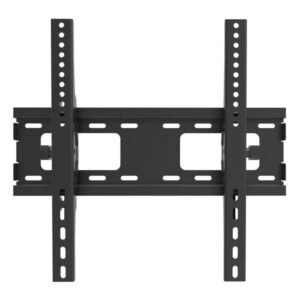
Tiltable Wall Bracket for LCD LED TV 23-55” Black: Easy to use and install, the popular model SH 44T is designed to fit any 23″-55″ curved & flat-panel TVs up to 50kg/110lbs. Freely tilting for 15° up and 15° down. Integrated bubble level assures easy installation alignment. Strength has been…
SKU: 433449386 - TV & Computer Stands, TV Mounts & Stands
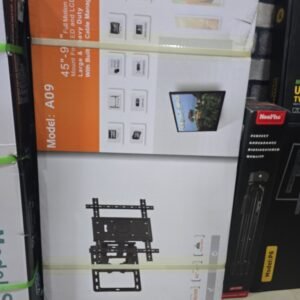
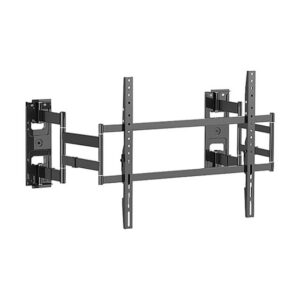
XL86 Full Motion TV Wall Mount 55-86 Inch
- Size: 55″ to 86″ LED / LCD TVs
- Load capacity: 50KG (110 lbs)
- VESA: 100×100 up to 690×500 mm, which covers most TVs from the big brands
- Full motion cantilever arm: pull the TV out from the wall and swivel it
- Built-in cable management: keeps wires organized along the mount
- Heavy duty build: made for large, heavy screens
SKU: n/a
TV & Computer Stands in Pakistan
Browse TV and computer stands in Pakistan for wall, desk, ceiling and floor-mounted display setups at SmartBazaar. The current category includes fixed, tilting and full-motion TV brackets, ceiling mounts, tabletop stands, mobile TV trolleys, monitor arms, multi-monitor stands, laptop-and-monitor supports and projector ceiling mounts. These products are highly compatibility-sensitive, so screen size alone should never be the only buying check.
Before ordering, confirm the display type, exact VESA pattern, screen weight, mount load capacity, installation surface and the movement you need. A mount advertised for a particular screen-size range may still be unsuitable if the rear hole pattern or weight does not match. Desk-mounted arms also depend on clamp or grommet requirements, while ceiling and wall mounts depend on the installation structure. Use current product cards for verified specifications, pricing and availability.
Shop TV & Computer Stands for Different Display Setups
The TV & Computer Stands category covers support formats for televisions, monitors, laptops and projectors. Current options include wall-mounted TV brackets, mobile floor stands, tabletop TV bases, single and multi-monitor arms, laptop-and-monitor combinations and projector ceiling mounts.
The right choice depends on screen type, size, VESA pattern, weight, installation surface and desired movement. You can browse TV mounts and stands, explore monitor arms or view laptop and projector stands.
What Is VESA Mounting?
VESA mounting refers to standardized spacing between mounting holes on the rear of compatible displays. A VESA pattern is normally written as horizontal distance × vertical distance in millimetres, such as 75 × 75 mm, 100 × 100 mm, 200 × 200 mm or 400 × 400 mm.
Those examples do not mean every TV or monitor uses them or that every mount supports them. Match the display’s exact VESA pattern with the supported VESA range of the stand or bracket before buying.
Screen Size Alone Is Not Enough
A screen-size range on a mount is only one compatibility reference. The display must also match the supported VESA pattern and remain within the mount’s verified load capacity.
A 55-inch TV does not automatically fit every bracket labelled for 55-inch displays. Two TVs with the same diagonal size can have different rear mounting patterns or weights. Always check VESA and weight together with screen size.
TV Wall Mounts
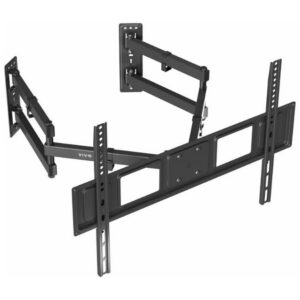
TV wall mounts can be fixed, tilting or full-motion. Compare supported VESA patterns, screen-size guidance, load capacity, wall distance and available tilt or swivel movement where verified. Wall construction also matters because different surfaces require different installation methods.
Do not assume a product described as “universal” fits every TV. The display still needs to match the mount’s stated VESA, weight and size limits.
Fixed vs Tilt vs Full-Motion TV Mount
Fixed: keeps the display close to one main viewing position with little or no angle adjustment. Tilt: allows vertical angle adjustment where supported. Full motion: may provide extension, swivel and tilt depending on the bracket design.
Movement range varies between products, so “full motion” should not be treated as one standard specification. Check the verified tilt, swivel and extension details for the exact mount.
TV Ceiling Mounts
Ceiling TV mounts suspend a compatible display from an overhead structure. Useful checks include supported screen size, VESA, load capacity, drop or height adjustment, tilt or swivel movement and the type of ceiling structure involved.
Tabletop TV Stands
Tabletop replacement stands support compatible TVs on a cabinet, desk or media surface. They can be useful when the original feet are unavailable or when a central base better suits the available surface.
Check base dimensions, VESA, supported size, load capacity and height adjustment where available.
Mobile TV Trolleys & Rolling Stands
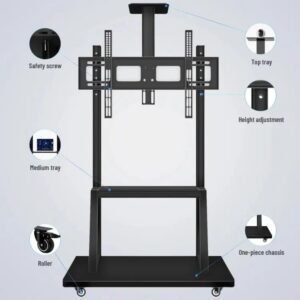
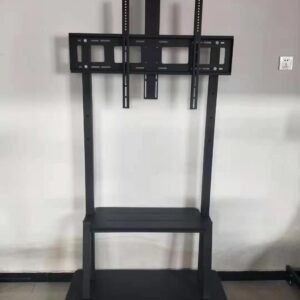
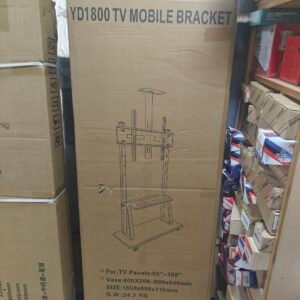
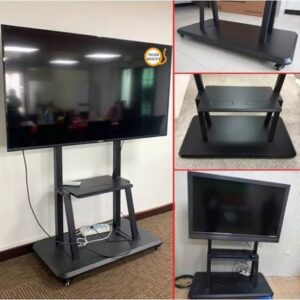
Mobile TV trolleys use a floor-standing base with wheels or casters, allowing a compatible display to be repositioned. Depending on the model, features may include height adjustment, locking wheels, shelves or equipment trays.
Compare supported screen size, VESA, load capacity, base footprint and any verified tray or wheel features.
Monitor Arms
Monitor arms hold compatible displays above or beside a desk and can provide adjustable positioning while freeing some desk surface. Depending on the model, an arm may support height adjustment, tilt, swivel, rotation or portrait and landscape positioning.
Check the monitor’s VESA, weight, screen size and desk-mounting method. Adjustable positioning is a practical setup feature, not a guaranteed medical or ergonomic outcome.
Gas-Spring vs Mechanical Monitor Arms
Gas-spring monitor arms use a tensioned mechanism to assist movement and balancing. Mechanical or fixed-joint designs may use poles, hinges or manually adjusted joints instead.
Neither type is universally better. Compare supported weight, screen size, adjustment range and mounting system.
Clamp vs Grommet Desk Mounting
A clamp mount attaches around the edge of a compatible desk. A grommet mount uses a suitable hole through the desktop where supported. Some monitor arms provide one method, while others may support both.
Check desk thickness, edge design, underside clearance and desktop strength. Do not assume every clamp or grommet method suits every desk.
Dual & Multi-Monitor Stands
Dual monitor stands support two displays, while quad or four-monitor stands support more screens where designed for them. Some systems position screens side by side, while others may support vertical arrangements.
For each screen, verify size, weight and VESA. Also consider spacing, orientation and the desk or base footprint.
Monitor Wall Mounts
Monitor wall mounts support compatible computer displays from the wall rather than the desktop. Compatibility still depends on VESA, display weight, screen size and wall structure.
If movement matters, compare tilt, swivel or articulation only where verified.
Laptop & Monitor Combination Stands
Some desk-mount systems combine a monitor arm with a laptop tray. These products can support two different device types from one desk-mounted structure where the design allows it.
Check laptop-tray dimensions, ventilation, monitor VESA, supported loads and clamp or grommet requirements where verified.
Projector Ceiling Mounts
Projector ceiling mounts use a different mounting approach from most TV and monitor brackets. Useful checks include the projector mounting pattern, bracket compatibility, ceiling drop, adjustment range and supported weight.
Do not assume VESA applies to every projector. Match the actual mounting points with the mount design.
Load Capacity — Why It Matters
Load capacity is the maximum equipment weight a mount or stand is designed to support under its specified conditions. The actual display weight must remain within that verified capacity.
Wall Type & Installation Surface
Mounting requirements differ between concrete, brick, wood or stud construction and other wall types. The fixing method and suitable hardware depend on both the wall and the mounting product.
Do not assume supplied anchors suit every surface. Follow the mount and installation-surface requirements.
Curved Screens & Mount Compatibility
A curved screen is not automatically compatible with every wall or desk mount. Compatibility still depends on the rear mounting pattern, VESA, screen weight, physical clearance and bracket design.
Cable Management
Some monitor arms and TV stands include cable clips, channels or concealed routing features. Where provided, these features can help organize power and signal cables around the stand or arm.
What to Check Before Buying a TV or Monitor Stand
- Display type: TV, monitor, laptop-support system or projector.
- Screen size: Check the product’s supported size guidance.
- VESA pattern: Match the display and mount exactly.
- Display weight: Verify the actual equipment weight.
- Load capacity: Keep the display within the mount’s stated limit.
- Movement: Choose fixed, tilt or full-motion where relevant.
- Installation type: Wall, desk, ceiling, tabletop or floor stand.
- Desk mounting: Check clamp or grommet requirements where relevant.
- Height and movement range: Use verified product specifications.
- Number of displays: Confirm support for each screen individually.
- Included hardware: Check the exact package contents.
- Current details: Review live specifications, price and availability.
What Affects TV & Computer Stand Prices?
Prices can vary by stand type, number of supported screens, VESA range, load capacity, articulation, gas-spring mechanism, trolley or base construction, shelves, height adjustment, brand and current availability. A fixed TV bracket, monitor arm and rolling TV stand perform different jobs and should be compared within the same product type.
Use SmartBazaar’s current product cards for live pricing and confirm VESA, weight and installation compatibility before comparing price.
Frequently Asked Questions
What types of TV & Computer Stands are available at SmartBazaar?
The category includes fixed, tilting and full-motion TV mounts, ceiling TV mounts, tabletop stands, mobile TV trolleys, monitor arms, multi-monitor stands, laptop-and-monitor supports and projector ceiling mounts. Inventory can change, so check the live category for current options.
What is VESA and why does it matter?
VESA describes standardized mounting-hole spacing on compatible displays. Your TV or monitor’s exact VESA pattern must match the mount’s supported pattern. Screen size alone does not confirm fit.
Is screen size enough to choose a TV wall mount?
No. You should also check the TV’s VESA pattern, actual weight and the mount’s load capacity and design. A mount can list the correct screen size while still being incompatible in another specification.
What is the difference between fixed, tilt and full-motion TV mounts?
A fixed mount keeps the display in one main position, a tilt mount allows vertical angle adjustment, and a full-motion mount may add extension, swivel or tilt depending on the model. Movement ranges vary by product.
What should I check before buying a monitor arm?
Check monitor VESA, screen size, weight, arm load capacity, adjustment range and desk-mounting method. For clamp or grommet designs, also verify your desktop can accept the stated mounting system.
What is the difference between clamp and grommet monitor mounts?
A clamp mount attaches around a compatible desk edge, while a grommet mount uses a suitable hole through the desktop. Desk thickness, edge design and underside clearance can affect which method works.
How do I choose a dual monitor stand?
Verify the size, weight and VESA pattern of both monitors, then compare those details with the stand’s per-screen support. Also check arm spacing, orientation options and desk or base requirements.
Can every TV mount support a curved screen?
No. Curved-screen compatibility depends on VESA, weight, rear clearance and bracket design. Do not assume a mount fits a curved display simply because the screen size falls within the advertised range.
What should I check before buying a mobile TV trolley?
Check supported screen size, VESA, display weight, trolley load capacity, height adjustment, base footprint and any verified wheel-lock, shelf or tray features. Confirm display compatibility before comparing mobility features.
What affects TV and monitor stand prices in Pakistan?
Prices can vary by mount type, number of screens, VESA support, load capacity, movement, gas-spring mechanism, base construction, shelves, height adjustment, brand and current availability. Check live SmartBazaar product cards for current pricing.